Scraping 10,000 Pages in Minutes: A Hands-On Test of Olostep’s Batch API
The experiment at a glance
The setup was deliberately simple. One Python script, one batch submission, one target: 10,000 pages from MDN’s documentation site. The goal was not to benchmark Olostep against competitors on identical hardware, but to answer a practical question for anyone assembling a corpus at scale: how fast and how reliable is a single large batch in practice?
The environment was Python 3.13.15 with Olostep SDK 1.2.2. The author installed the SDK alongside requests, for fetching the MDN sitemap, and tqdm, for progress tracking. An API key was supplied through the OLOSTEP_API_KEY environment variable, with a prompt as a fallback.
The choice of MDN as a target is sensible for a test like this. It has a published sitemap, which makes sampling 10,000 unique URLs straightforward and repeatable.
The headline numbers
The numbers tell a story in two acts. The first act is fast. The second act is not.
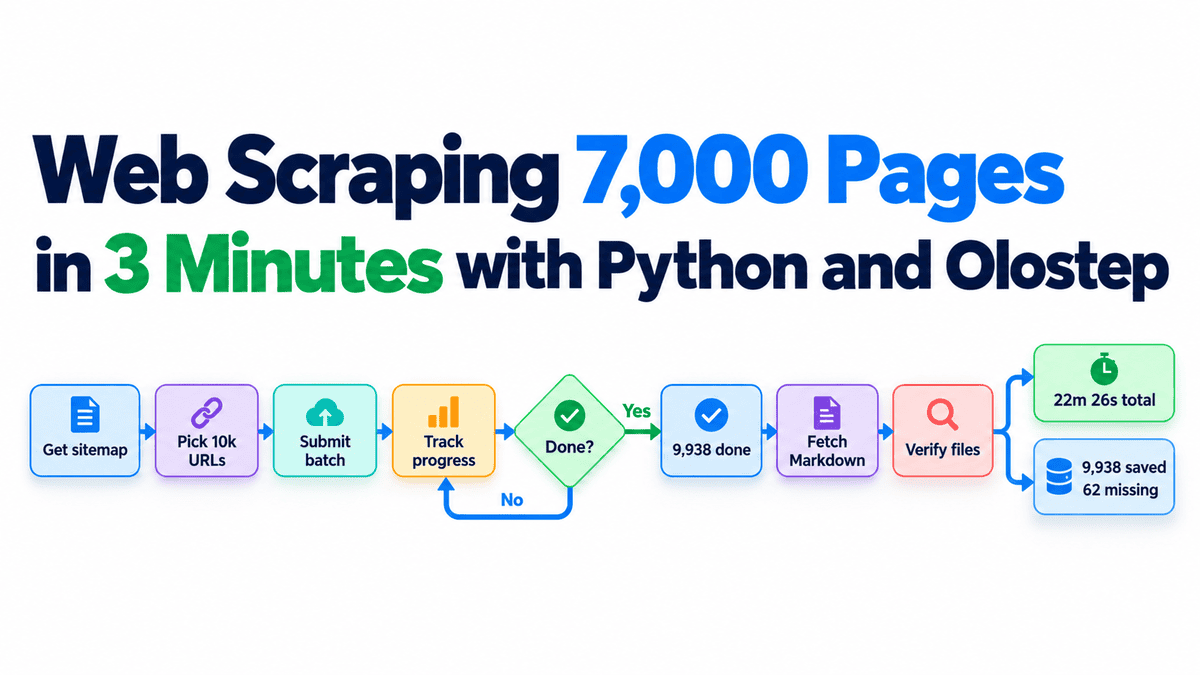
- 7,225 pages in about 2 minutes 52 seconds. This is the figure that will end up in the marketing material, and it is genuinely impressive.
- 9,938 pages completed at around 18 minutes 30 seconds. The remaining pages took far longer than the opening burst. That is the classic shape of a batch job: the bulk of the work finishes quickly, and the tail stretches out as stragglers, retries and slow responses accumulate.
- 22 minutes 26 seconds for the full job, covering scraping, downloading and verification.
- 2 minutes 25 seconds to download 9,938 Markdown files once scraping had finished.
The workflow, and the three details that mattered
The author’s workflow is a reasonable template for any large scrape: install the SDK with requests and tqdm, configure the client and create a data folder, download the MDN sitemap and randomly sample 10,000 unique documentation pages to a CSV with duplicate checks, submit all 10,000 URLs as a single batch and save the batch ID, pull completed pages and write each to a Markdown file, then count how many of the original URLs produced valid output.
That last step is the one people skip. It is also the one that produced the most useful finding in the entire test.
Three implementation choices did most of the heavy lifting in this run.
First, a workaround. SDK version 1.2.2 had a response-handling issue that caused errors when checking batch status, so the author patched around it. This is normal for early-stage tooling, but it is a reminder to pin versions and read the changelog before trusting a client library in production.
Second, concurrency with restraint. The download stage handled up to 96 concurrent retrieval requests, which is how 9,938 files were pulled in about 2 minutes 25 seconds. That number is aggressive enough to matter and modest enough to avoid melting a local machine or triggering rate limits.
Third, resumability. The download code skipped files that already existed on disk. If the download was interrupted, rerunning it picked up where it left off instead of starting over. This is a small piece of logic with outsized value. Anyone who has lost an hour of progress to a dropped connection understands. If you are building more elaborate pipeline orchestration around that kind of logic, patterns like the strategy pattern help keep retry and retrieval behavior swappable rather than tangled into one function.
The 62 missing pages: why a completed batch is not a completed dataset
Of 10,000 submitted URLs, 9,938 were saved as Markdown files. Sixty-two were not. That is a 99.38 percent success rate, which sounds excellent until you remember that the batch reported itself complete.
This is the central lesson of the test. A completed batch is a statement about the job queue, not about your dataset. Pages can fail for a long list of mundane reasons: timeouts, transient server errors, pages that render differently than expected, content that does not parse cleanly. If your pipeline treats batch completion as a finish line, those failures enter your corpus as silent gaps.
For teams building training data or retrieval corpora, silent gaps are worse than loud failures. A missing documentation page might mean a retrieval-augmented system confidently answers a question with no supporting source. Multiply that across a large scrape and you get coverage holes that are hard to diagnose and easy to ship. The fix is unglamorous: reconcile against the input list, log the misses, and retry them in a second pass. Verification is not a nice-to-have step at the end of the tutorial. It is the step that determines whether you have a dataset at all.
Platform claims versus a single test
Olostep’s own positioning is worth putting next to the author’s numbers. The company says its Batch API accepts up to 10,000 URLs in a single batch, and it is expanding from developer-focused scraping tools toward web data infrastructure for enterprises. Its co-founder has stated that the platform can process 100,000 pages in under 25 minutes for enterprise workloads, with use cases spanning market research, competitor monitoring, product intelligence and AI applications. Those figures are vendor claims from a single author’s run, not an independently verified benchmark, and the 10,000-page test says nothing about how performance holds at ten times the volume, on different target sites, or under the tail behavior that dominated the second half of this job.
What the test does confirm is that the order of magnitude is real for the initial burst: roughly 2,500 pages per minute was achieved on a single batch, though the full job averaged far lower.
Engineers evaluating any scraping platform should ask for the same things regardless of vendor: measured success rates with a defined failure taxonomy, tail latency distributions rather than averages, documented retry semantics, and a clear story for resuming interrupted jobs. If a provider cannot tell you what happens to the 62 missing pages, the throughput number is decoration.
Speed is table stakes, verification is the differentiator
Batch aggressively, but plan for the tail. A single submission of thousands of URLs is the right shape for large corpora. Just budget your time around the slow finish, not the fast start.
Always persist the job identifier. Saving the batch ID is what makes resumption possible. It costs one line and saves entire afternoons.
Make retrieval idempotent. Skipping already-downloaded files turned an interruption into a minor inconvenience. The same discipline applies to any stage of a pipeline that writes to disk.
Reconcile outputs against inputs. The verification pass is where the real quality signal lives. Track success counts, log failures with reasons, and retry the remainder. If you are feeding results into downstream tooling, the same principle of checking what actually came back applies whether you are routing requests through a unified model API layer or fitting a model and inspecting its full output rather than one attribute, as these notes on statsmodels uncertainty argue.
Treat vendor numbers as hypotheses. Test them on your targets, with your failure modes, before you build a pipeline around them.
The 7,225 pages in under three minutes is a good demo. The 62 missing pages is the engineering lesson. Build for the second number and the first one takes care of itself.